You can automatically access the full text of articles to which University library subscribes by installing browser extensions.
Click and read
This browser extension developed by Inist-CNRS provides one-click access to publications listed on a web page (Google Scholar, Wikipedia, etc.) when a document identifier (DOI, PMID) is mentioned and your institution (Université Grenoble Alpes, CNRS, etc.) owns the resource. Once installed and configured, this extension, compatible with Firefox, Safari, Chrome and Edge, indicates resources accessible via the logo . Just click on it to instantly display the full-text document.
Click & Read works with all web pages that mention documentary references, including Beluga, Google Scholar, Wikipedia, publishers' sites, and so on.
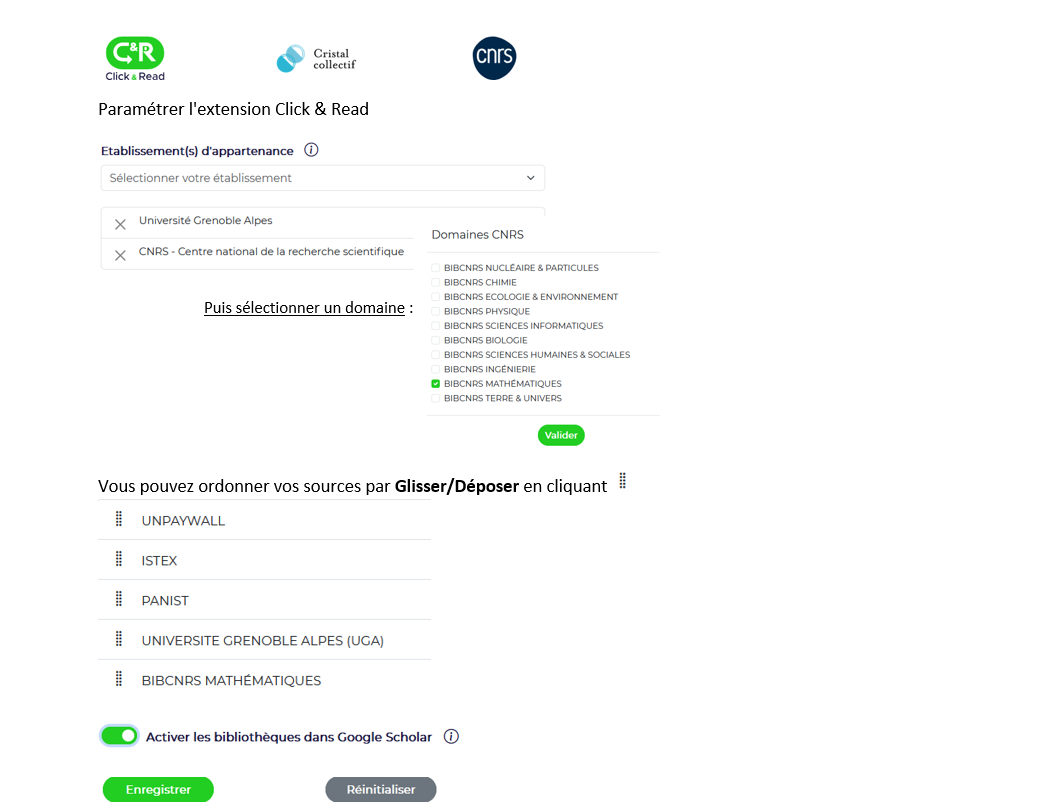
Here's the suggested configuration for a researcher with access to UGA resources and the CNRS INSMI portal: .
Other browser extensions (EZproxy)
These browser extensions, available only for Firefox and Chrome, give you automatic access to the full text of articles to which the University library subscribes, after initial authentication with your university login. If the University library is not subscribed, access to the full text will not be possible.
Here are the installation procedures:
Share linkCopyCopyClose modal windowShare this page URLI recommend this page:Available at this address :The page will then be accessible from your "My favorites" menu.Stop videoPlay videoMute soundPlay soundChat: Got a question?Chatbot Robo FabricaMatomo visitor statisticsX (formerly Twitter)




 .
.